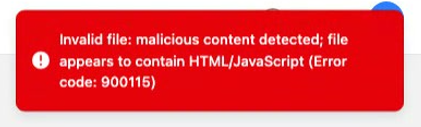
When uploading a document to Snug, you may see this message:
“Invalid file: malicious content detected; file appears to contain HTML/JavaScript (Error code: 900115)”
This guide explains what it means and what to do next.
What does this error mean?
Snug runs security checks on uploaded files to help protect renters and agencies.
This error usually means the file you uploaded was flagged as potentially unsafe. This can happen even when the document looks normal, for example, if:
- The file was saved or exported in an unusual way
- The file contains embedded content
- The file is corrupted
- You accidentally uploaded the wrong type of file
How to fix it
Try the steps below in order (most people solve it within 1 to 2 attempts):
- Create a clean copy
- If possible, print to PDF (instead of “Save as…”) and upload the new PDF.
- If it’s a photo or scan, try scanning again or taking a new photo.
- Try a different file format
- Save/export the document as a fresh PDF, JPG, or PNG.
- Avoid any “web page” or “HTML” export options.
- Upload the original version
- If you have the original document (before edits or downloads), try uploading that version instead.
- Refresh and try again
- Do a hard refresh in your browser.
- Make sure your browser is up to date.
- Then try the upload again.
If it still won’t upload
Reply to Support with:
- the file type (PDF/JPG/PNG)
- where the file came from (e.g. emailed, downloaded from a portal, screenshot)
- a screenshot of the error message
This helps us confirm what’s happening and advise the best next step.
What the error looks like (example)
We value your privacy and security, and publish our approach at snug.com/safety. You can read our policies and terms at snug.com/terms.